Reflections on CEP 810

It feels like I just started CEP 810 yesterday. Sadly, it was 7 weeks ago which means my time in this class is at an end. Over the past seven weeks, I have learned many things from CEP 810.

Thanks to How People Learn: Brain, Mind, Experience, and School (Bransford, Brown and Cocking, 2000) I was able to pick all sorts of new ideas. As a teacher, I find it hard to surrender control of my classroom. Student centered learning has always sounded great, but I have never been able to fully put it into practice. Part of this is fear, and another was learning how to design the lesson plans accordingly. After reading the first three chapters, I began to understand how to design student centered lessons.

I continued to think about this as I designed my 21st century lesson plan. Instead of just building objects in Minecraft and showing them off, I decided to allow my students to do so. It gives them an opportunity to play and learn by doing. The money to pay for Minecraft has always been available, I have just struggled to find appropriate lesson plans. With the knowledge from Bransford, Brown, and Cocking, I was able to design a plan and I feel much better about designing more ideas and lessons using these methods.

The TPACK activity confirmed what I’ve always believed. Technology is only as good as your lesson. If you just use technology for the sake of technology, you will not successfully teach. Instead, technology must be implemented in the classroom in a way that fits the curriculum and the teaching style.

The Network Learning Project showed me that it was possible to reach out to the internet for new skills. For that, I learned how to repair a Nintendo. I acquired this skill by doing. Instead of hiring someone to do it for me, I did it myself. It proves that learning by doing is a powerful tool.

I still have questions about how to implement technology with my teaching style. As I continue on through the MAET program I expect to learn some of these answers. CEP 810 was a great starting point on my journey to become a 21st century teacher.

Creative Commons License
This work is licensed under a Creative Commons Attribution-NonCommercial 4.0 International License.
21st Century Lesson Plan

Technology changes every single year. What we thought was impressive in 2006, looks archaic in 2016. New technology has a way to make us take for granted some of the breakthroughs that came before.

During the Civil War, Mathew Brady used pictures to tell a story and teach readers the scope of what was happening places like Sharpsburg, MD and Gettysburg, PA. The pictures were shocking and showed the immense scale of the damage caused by the war. These pictures were rare at the time, and offered a new look into faraway places. As the camera became more widely available, people began to see pictures of lands and objects they could have only imagined before. The Pyramids of Giza would be an example of this.

As the internet rose in the 90s and the 2000s, these pictures were spread all over the internet. They became common and were taken for granted. The magnificence of the achievements of the Egyptians becomes lost when viewed only through two-dimensional images.

To counter this, I propose to create a dynamic learning environment similar to the ones outlined in A New Culture of Learning: Cultivating the Imagination for a World of Constant Change (2011) by Douglass Thomas and John Seely Brown. I want to let the students build the pyramids themselves. Obviously, I can not take my students to a quarry to cut the stone and somehow slowly transport it to a large empty field to build a pyramid over the course of 30 years. Instead, I will use the 21st century technologies my students already use and understand.

To accomplish this, I will use Minecraft: Education Edition to allow the students build replicas of the pyramids without breaking their backs at the quarry. I am hoping to allow them to experience the grandiosity of these pyramids and the difficult task to make them. To do so I have devised this lesson plan.

I was asked by my partner how I planned to control the students as they do this. My response is that the old MinecraftEdu allowed teachers to control exactly what tools my students can use, what they can and cannot do to other structures, and where they can go. The new edition will be very similar to this and allow me to control their access for educational purposes.

Using these methods and tools, I very much hope to open their eyes to the last remaining place from the original 7 Wonders of the World.

Cooking with TPACK

One thing I have learned as a teacher is that I do not have control over where my students came from or what their background is. Likewise, I do not always have control of the resources the school provides me. I have to find a way to take the tools I have and adapt them for the students I have. TPACK is a framework that helps us think of ways to do this.

The video below is an example of having to adapt. I found myself struggling to cut cheddar cheese with a spoon. This is a ridiculous task, yet this was the tool I had. I had to find a way to make it work. I ended up making it work by using the simplest tool available to assist me; my left hand. It’s a great example of what happens when we rely on technology too much in the classroom. Many times we are told that we cannot teach without the latest and greatest technology, yet sometimes the only way to reach some of our students is to use old fashioned tools that are always on hand. It may not be the prettiest way to go about doing and certainly not the most fashionable, but it can get the job done.


Network Learning Project Finale

My Network Learning Project this quarter has been to repair my Nintendo. In last week’s post, I left off waiting on a final part from Ebay. It arrived at my house on Wednesday morning. I immediately set to work repairing the Nintendo.

You can see in the video below how that went.

As you now know, I was successful in my endeavor. I was very surprised at how easy it was to find the information. I was even more surprised with how easy the internet community made it for me to follow the instructions and get the Nintendo repaired.

I very much plan on using YouTube videos and help forums to solve my everyday problems. I’ve already used YouTube this week to create a stainless steel polish out of vinegar and dish soap. These videos are great guides to household hacks that can come in handy at any moment. I thoroughly enjoyed this project and the ideas I learned from it.

List of Image Sources

Harvest of the Years: Henry Ford and Family, ca. 1939 (Home Movie). Retrieved from https://archive.org/details/gov.archives.arc.91639

NASA (Author). (2015).Earth-DSCOVR-20150706 (Photograph). USA: NASA. Retrieved from http://www.nasa.gov/sites/default/files/thumbnails/image/187_1003705_americas_dxm.png

A Very Pinteresting Idea

For this week’s GTD topic, I decided to explore the world of Pinterest. I have been told for years by my fellow teachers that Pinterest was a great way to gather ideas for lesson plans and to organize them with pins.

Upon joining Pinterest, I followed five topics. They were Geography, American History, World War II, Education, and History. These are subjects I teach and need help with from time to time. I was able right away to find some good ideas for teaching the five themes of geography. There were plenty of lesson plans available which were very helpful. I was impressed with this part of the assignment.

Logging in a few days later, I became less impressed. I was very shocked to discover that the World War II topic generated pins on my home feed with extremely graphically violent photographs. Do not get me wrong, as a history teacher I do not believe history should be censored. However, I feel strongly that people need trigger warnings about what they are going to see. I do not believe that I or anyone else should be greeted with graphic violence upon logging into Pinterest.

Overall, I will probably keep using Pinterest for lesson ideas. However I did need to unfollow the World War II topic. I think Pinterest can be a great tool for collecting and organizing, but it should be used carefully.

Networked Learning Project #2

This week I began to work on restoring the Nintendo.

In my google searches, I found many detailed guides on how to replace this part, such as this wonderfully detailed guide from iFixit. However, there were parts of this guide I didn’t like. I did not like how I had to disconnect the controller ports and power buttons. These features are hooked into the motherboard with the type of clip that is very hard to disconnect and reconnect.

Instead of using the iFixit guide, I found an alternative guide from Hitgaming. I like this guide for a couple reasons. First, it shows an alternate way to replace the 72 pin connector without disconnecting the controller ports. Second, it offers page by page instructions instead of displaying it all on one page. It helps to cut down confusion and keep me on track.

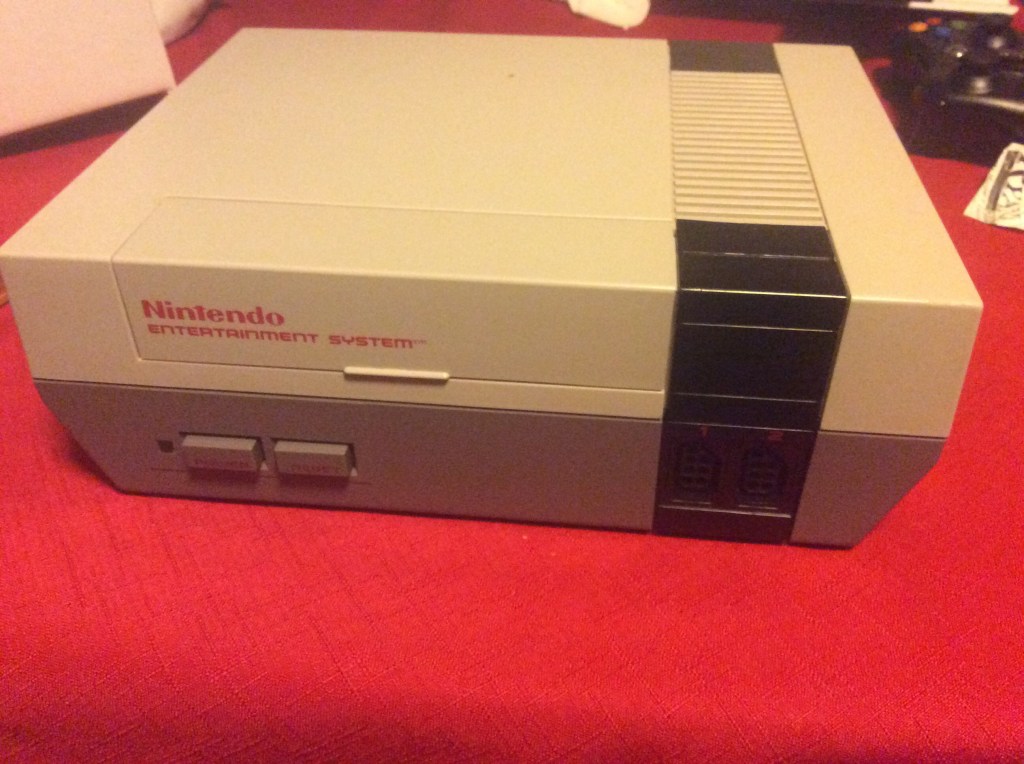
The first step towards completing this project was to locate my NES. After an hour of searching, I found it exactly like I remembered.

image

The second step was to order the necessary part. I found the 72 pin connector on eBay. It cost me a total of $8.48. By comparison, a working Nintendo would cost upwards of $50.00. The part will arrive on Thursday, September 29th.

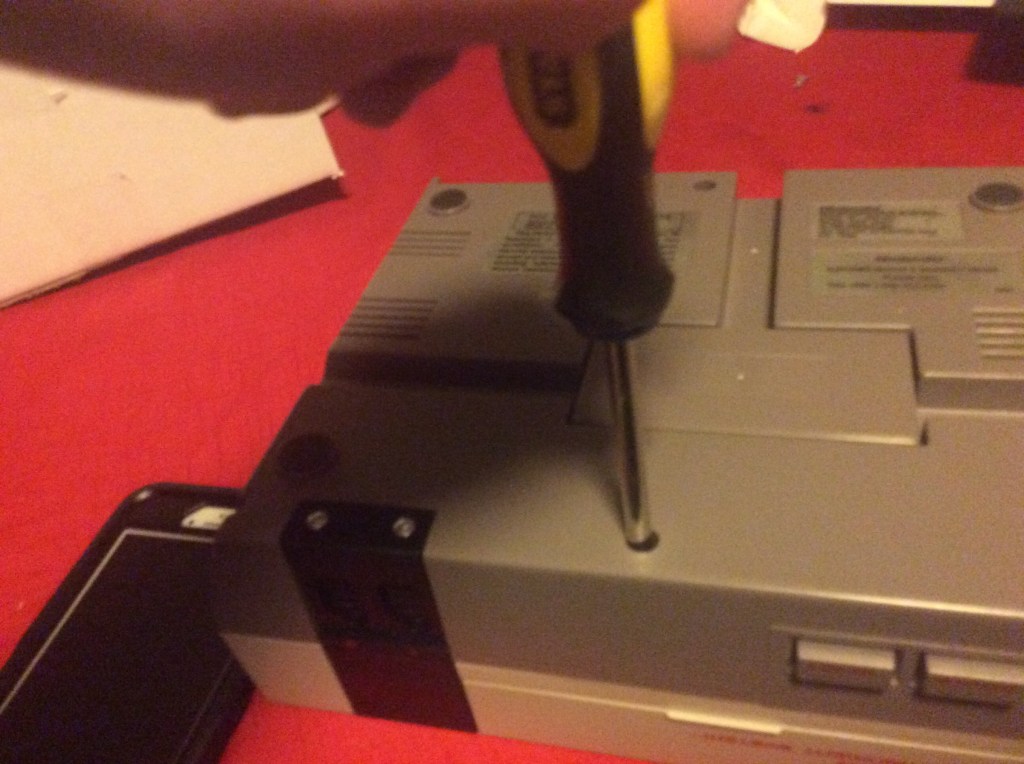
I decided to take off the back to look inside. This is where I ran into a brief amount of trouble. It turns out that my selection of Phillips head screwdrivers is not quite what Nintendo had in mind. You can see in this Vine how well that went.

After borrowing a better screwdriver from a friend I got to work.

image

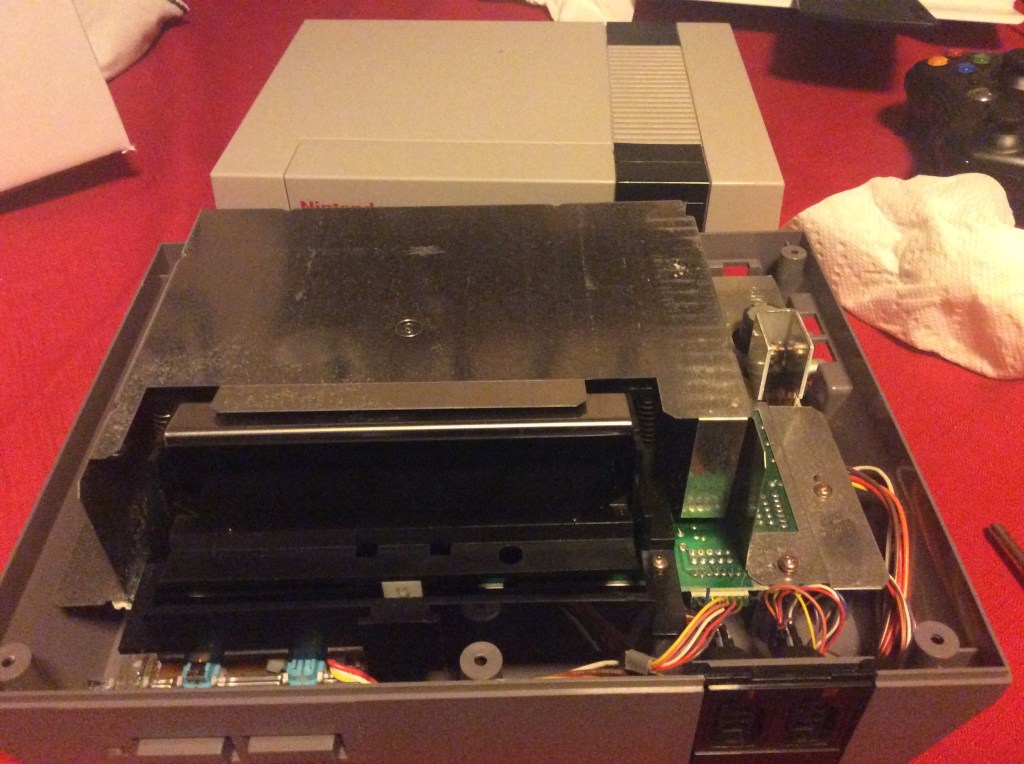
I got my first look inside. I realized it is incredibly dusty.

image

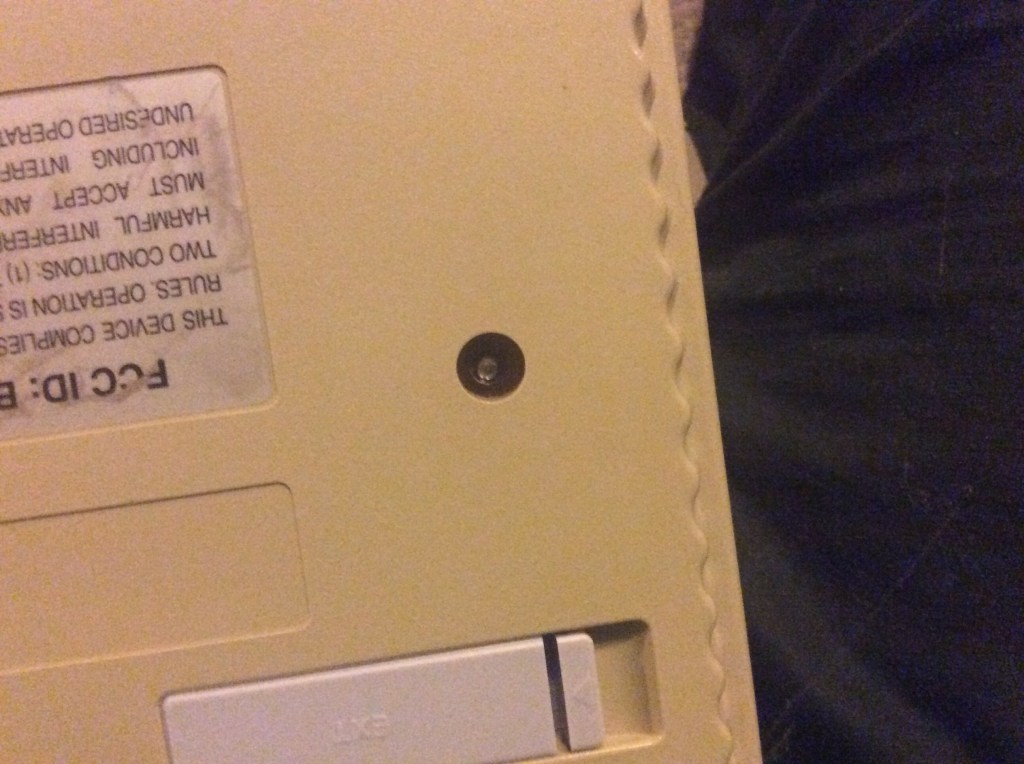
It is also beautifully simple. It was suggested that I look into widening this project to fix other systems. I would love to, but the truth is I can’t. The NES was the first and last system you could really do the work on yourself. Nintendo realized almost immediately that it could make more money by creating special screws for their systems. The only way you could it up was with a special tool that was only provided to Nintendo and repair shops who paid a licensing fee. You can see a picture of it here on my Super Nintendo.

image

The NES was so simple yet so complex that it completely changed the game. I am leaving you here for this week. For the final blog post, I will remove the old parts and replace them with new parts. My Nintendo will live again.


Professional Learning Networks

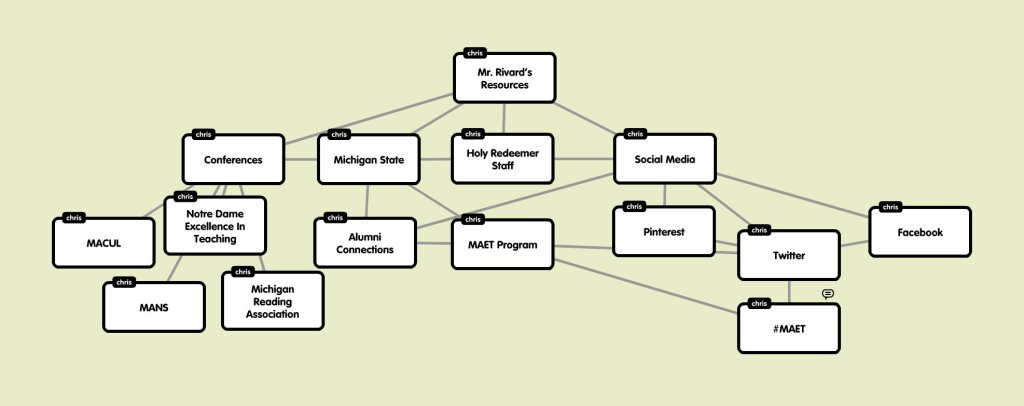
To explain where I get my teacher resources from, I have created a Popplet of my professional learning network. Here it is.

the-resources-tree

As you can see, most of my resources link together. In today’s digital world, professional learning networks can be accessed from pretty much anywhere.There is now a sense of connectivity between these networks that were once separated. Seeing this tree in it’s present form helps me to understand how I can always reach out for ideas to different groups.

Network Learning Project: How to Repair a 31 Year Old Computer.

In today’s world video games are everywhere. When our students are not in school, they are most likely gaming.A whole industry of Let’s Play videos have taken over YouTube. It is hard to image that 31 years ago, it very much appeared that the medium of video games was dead.

The first and second generations of video games were dominated by Atari. Although innovative, Atari had very little quality control mechanisms in place. In 1983, Atari released a licensed video game version of E.T. It was supposed to be the ultimate Christmas present. Instead, it was a disappointment that saw millions of copies returned to the stores in a week. The failure of this high profile of a game caused a massive market crash that endangered the video game industry and nearly bankrupted Atari.

The industry remained in trouble until 1985. That was the year the Nintendo Entertainment System came out. It was fun to play, had novel games, and boasted quality control that made sure every experience was a good one. It saved the video game industry. My older sister Katie received her Nintendo the year it came out. As a child I loved playing with it. It was my introduction to a whole new world of video gaming.

The best part about these systems is that they were built to last. My 1985 Nintendo worked until 2010.Even though it has not worked in 6 years, I have never been able to bring myself to get rid of it. For this project, I began looking into the feasibility of repairing it.

As part of the research into this idea, I came across several sources that stated that most problems with the Nintendo were caused by a part known as the 72 pin connector.It is the part that connects the game cartridge to the system. After 31 years of use, it is prone to rusting. I have discovered that these parts are cheap and easily replaced. I have found two sources with two different methods on how to fix the 72 pin connector.

The first source describes how to clean and repair the Nintendo without replacing the part. I am not sure if this source qualifies for this assignment as it is on a blog and not necessarily a help forum.

The second source i have found is a YouTube video by the user quickfreeze4. that shows me how to replace the part. I am planning on using this video.

I will check back in a few weeks to update everyone on how this is going!

Learning: A Study in Successful and Unsuccessful Setting

For this assignment, I wrote about what learning means and how it has related to each of my previous schools. I took a look at where it was successful in my past and where it was unsuccessful. I pointed out how each school failed and succeeded in promoting learning. At the end I wrote about how technology made a major difference in the schools. You can read my essay here.

What I Learned in CEP 811

To begin with this post, I thought I would copy all of my blog posts and put them into Wordle. Here is the result.

wordle

Let’s look at three of the big recurring words.

  1. Classroom: I learned how to maximize the space in my classroom to emphasize collaborative and maker-inspired learning. I not only learned the principles behind this and designed a classroom in Sketchup, but I actually redesigned my real life classroom to match my designs. It has been a phenomenal success so far.
  2. MakeyMakey: I actually learned how circuits worked. As part of our lessons, my students go to the Michigan Science Center four times a year to learn in the field. They conduct experiments with the museum staff and and learn principles of science. As a social scientist, I know very little about physical, biological, or chemical science. I am usually unable to help my students in their experiments. However, the last two visits have focused on using and creating circuits. With my experience in MakeyMakey, I was able to help guide my students through the learning and take some of the pressure off the museum staff.
  3. Learning: Most importantly, I have come to understand that learning can be student driven. Learning by doing, while scary for a young teacher, is a valuable resource to a class. By allowing my students to learn through educational technologies such as Minecraft and MakeyMakey, I have made history come alive for them.

CEP 811 has taught me quite a bit about my practice. I will use what I have learned here for the rest of my life.